 ®
®
Direct Answer
Master reseller hosting is a hosting account that lets you create other reseller accounts, not just ordinary cPanel websites. A normal reseller logs in to WHM (WebHost Manager) and creates cPanel accounts for clients. A master reseller does the same, but can also turn some of those accounts into resellers of their own, give them limits, and let them sell hosting under their own brand.
So the question is not "is master reseller bigger than reseller?" It is "do I need to hand out reseller accounts to other people?" If you are an agency hosting your own clients' sites, a normal reseller plan is usually enough. If you plan to onboard partners, sub-agencies or freelancers who each run their own hosting customers, a master reseller plan is the layer built for that.
How the Layers Fit Together
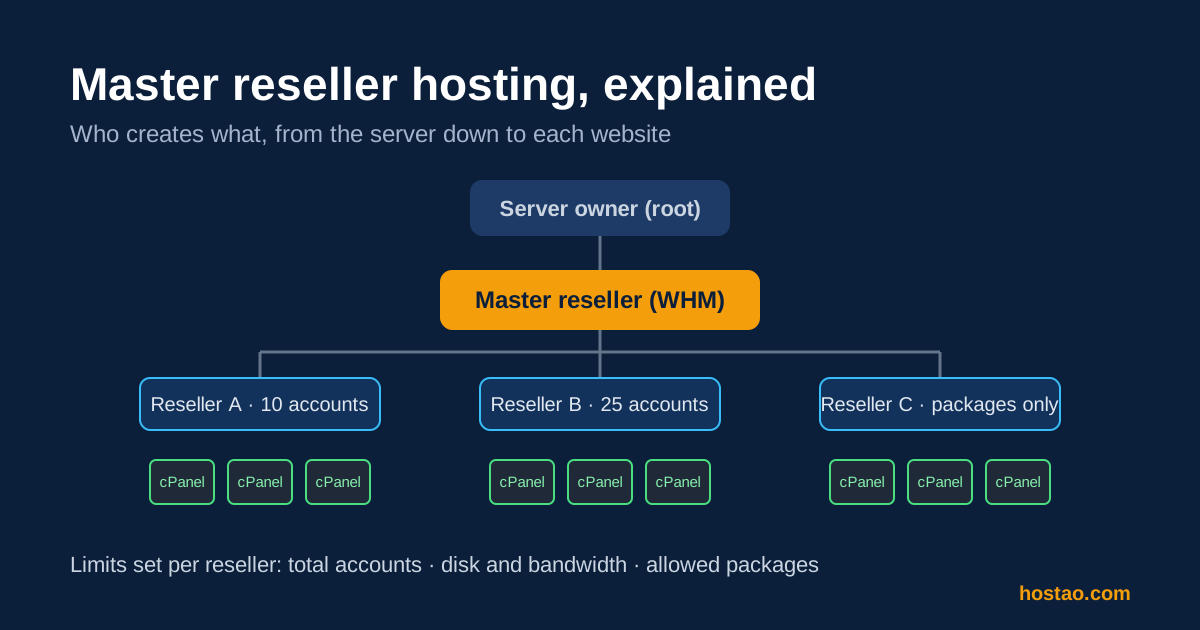
Shared cPanel hosting works as a chain of accounts. Each layer can only hand out what the layer above it has given it.
| Layer | Logs in to | Can create | Typical user |
|---|---|---|---|
| Server owner (root) | WHM with full access | Anything on the server | The hosting provider |
| Master reseller | WHM with reseller privileges | cPanel accounts and reseller accounts | Hosting businesses, larger agencies |
| Reseller (sub-reseller) | WHM with the privileges you allow | cPanel accounts within limits you set | Freelancers, small agencies, partners |
| cPanel account | cPanel | Email, files, databases, subdomains | The end client's website |
The important part is the middle. As a master reseller, you are effectively a small hosting provider. Your sub-resellers see a WHM that looks like their own, and their clients may never see your brand, let alone the provider's.
What WHM Actually Lets You Control
Everything a master reseller does with sub-resellers runs through standard WHM screens. cPanel's own documentation describes the main ones, and they are worth knowing before you buy, because your provider decides which of them you can use.
Reseller Center. This is where reseller status is added to or removed from an existing account. You create a normal cPanel account first, then grant it reseller privileges. From here you can also change account ownership, email all your resellers, and jump to each reseller's limits and usage.
Edit Reseller Nameservers and Privileges. This is the control screen for each sub-reseller. According to cPanel's documentation, it lets you limit how many cPanel accounts a reseller can create in three ways:
- Total number of accounts, a simple cap.
- Resource usage, a maximum disk space and bandwidth figure in megabytes.
- Specific packages, so the reseller can only create accounts from packages you approve, optionally with a per-package count.
The same screen controls the reseller's feature list through Access Control Lists (ACLs). These decide whether a sub-reseller can, for example, create packages with unlimited disk or bandwidth. It also sets the nameserver IP addresses for the accounts they create.
One detail matters here: cPanel notes that the provider can enable or disable these screens for resellers. A plan that lists "unlimited resellers" is only useful if your own account has been given the privileges to create and manage them. Ask before you buy.
Overselling, Explained Without the Marketing
You will often see "overselling enabled" on master reseller plans. cPanel describes it plainly: when overselling is allowed, limits are measured against the disk space your accounts actually use, not the total of the quotas you hand out. Without it, the quotas you assign must add up to no more than your allocation.
In practice, overselling lets you give each sub-reseller a generous quota on paper, because most sites never use their full allowance. It does not create extra storage. If your customers really do fill their quotas, you hit your plan's real limit and need to upgrade or rebalance. Treat overselling as a planning tool, and check real usage every month.
Master Reseller vs Reseller vs VPS
| If you need to... | Best fit |
|---|---|
| Host your own clients' websites under your brand | Regular reseller hosting |
| Give partners their own WHM so they can sell hosting | Master reseller hosting |
| Install custom software, change server settings or run non-cPanel stacks | VPS or dedicated server |
| Keep each client on separate resources with root access | A VPS per client |
A master reseller account is still shared hosting. You get more delegation power, not root access. If what you actually want is to tune PHP at the server level, run Docker or install your own control panel, a VPS is the right tool, not a bigger reseller plan.
For a closer look at the first step on this ladder, see shared vs reseller hosting.
Who Actually Needs It
Master reseller hosting earns its keep in a few clear situations:
- Agencies with partner networks. You work with freelance designers who each have a handful of clients. Give each partner a reseller account with a fixed number of cPanel accounts, and they manage their own customers.
- Hosting start-ups. You want to sell reseller plans yourself, not just shared hosting, without running your own servers on day one.
- Regional businesses. You serve several markets and want local partners to sell under their own names while you keep the infrastructure relationship.
It is usually the wrong choice when you are a solo developer or a small agency hosting 10 to 40 of your own client sites. A normal reseller plan is simpler, and you will not use the delegation features you are paying for.
Your Responsibilities Grow With Each Layer
This is the part most comparison pages skip. When you create sub-resellers, you become responsible for what happens under them:
- Abuse and acceptable use. If a sub-reseller's customer sends spam or hosts malware, your account is the one the provider contacts, and your service is the one at risk.
- Support. The provider supports you. You support your resellers. Decide in writing who your resellers' customers contact, and how fast you answer.
- Billing. Sub-resellers pay you, not the provider. If they stop paying, you still owe your own bill.
- Backups and restores. Know what the provider backs up, how long it is kept, and how a restore is requested. Then tell your resellers exactly what they can rely on.
None of this is a reason to avoid master reseller hosting. It is a reason to set rules before you hand out the first account.
Questions to Ask Before You Buy
- Which WHM reseller screens and ACL privileges will my account have, including creating and editing resellers?
- Is overselling enabled, and what happens when my real usage reaches the plan limit?
- Are per-account resource limits in place (for example through CloudLinux), so one busy site cannot slow down the rest?
- Can I use my own private nameservers so the setup is fully white-label?
- How are backups run and restored, and who requests a restore for a sub-reseller's customer?
- Is billing automation software, such as WHMCS, included with this plan, or arranged separately?
- What is the upgrade path if I outgrow the plan: a larger master plan, a VPS or a dedicated server?
How Hostao's Master Reseller Plans Fit
Hostao's reseller hosting page lists four US master reseller plans. Each one includes WHM and cPanel, unlimited reseller accounts, CloudLinux with CageFS isolation, NVMe SSD storage, overselling, Softaculous, the SitePad website builder and a white-label setup, with billing cycles from one month to 36 months. Billing automation is listed as a path to confirm per plan; the WHMCS options page explains how to check what is included before you order.
If your partners are spread across regions, the multi-location reseller plans let you pick a server location from the listed data centres instead.
Before ordering, it is worth reading the dos and don'ts of running a reseller hosting business. If you are unsure which layer you need, contact Hostao with the number of partners and sites you expect, and the team can recommend the simplest plan that covers it.
Frequently Asked Questions
What is the difference between reseller and master reseller hosting?
A reseller can create cPanel accounts for websites. A master reseller can also create reseller accounts, so other people can sell hosting from inside your allocation, each with limits you set in WHM.
Can my sub-resellers see my brand or the provider's?
With a white-label setup and private nameservers, sub-resellers and their customers see your branding. What remains visible depends on how WHM and the nameservers are configured, so check this before you launch.
Does overselling mean I get more disk space?
No. Overselling lets you hand out quotas that add up to more than your plan, because limits are counted against actual usage. Your real storage limit stays the same.
Is master reseller hosting the same as a VPS?
No. It is still shared hosting managed through WHM, with no root access. A VPS gives you your own server environment and full control, but you also manage more yourself.
Do I need WHMCS to run a master reseller business?
You do not need it to create accounts, because WHM handles that. Most hosting businesses use billing software such as WHMCS to automate invoices, account creation and suspensions once they have more than a handful of customers.
Sources
- cPanel documentation, Reseller Center, checked 14 October 2026.
- cPanel documentation, Edit Reseller Nameservers and Privileges, checked 14 October 2026.
- Hostao reseller hosting plans, plan features as listed on 14 October 2026.
Editorial Team
Content strategist and editor specializing in web hosting guides, digital marketing, and business growth strategies.
Ready to Get Started with Hostao?
Compare Hostao hosting plans, review the current checkout terms, and choose the right starting point for your website.
View Hosting Plans